Spending insights
The completed trip joins your spending history with store and category breakdowns.
GroceryBudget turns a grocery receipt into an editable shopping trip. Photograph the receipt, review the extracted items and prices, then save it to update your spending insights, price memory, and store history.


How it works
The scanner does the repetitive entry. You stay in control of what becomes part of your shopping history.
Use the camera or choose a receipt image you already took.
Check the extracted items, prices, quantities, store, date, and total.
Edit a row or deselect a code, discount, or line you do not want to keep.
The trip updates your insights, store history, and remembered prices.
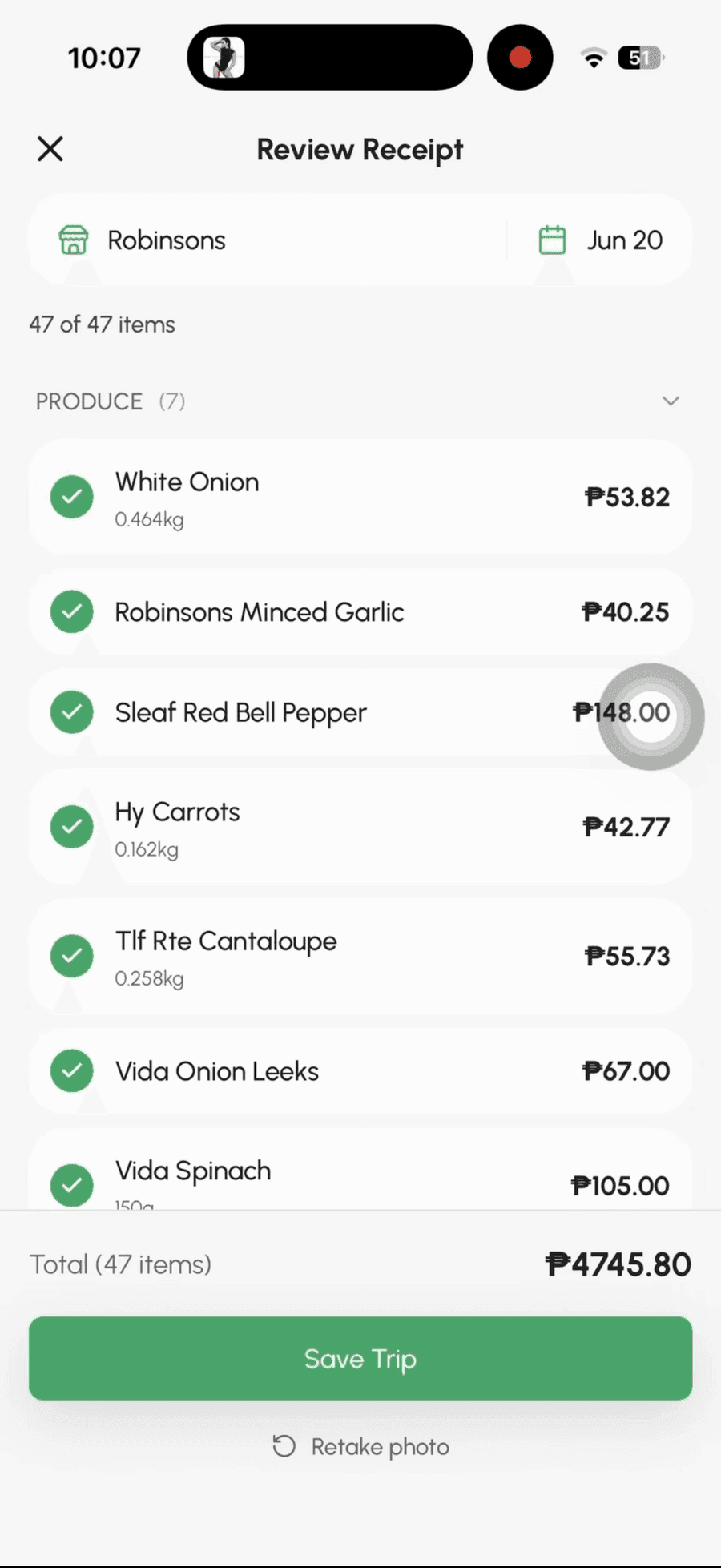
Review before save
Grocery receipts use abbreviations, store codes, discounts, and faded thermal print. That is why GroceryBudget shows the extracted trip before saving it.
What happens next
The completed trip joins your spending history with store and category breakdowns.
Recorded prices can be suggested when you add those groceries to a future list.
Repeat trips build a personal record of what each item cost at each store over time.
Shopping now? Use the price-tag scanner before checkout. Every saved trip can then build your personal grocery price history.
Three scans included
Try the complete receipt-to-history workflow with 3 included scans. Premium keeps receipt and price-tag scanning unlimited when you are ready for more.
Designed for grocery receipts rather than business-expense accounting. You can correct any item before saving.
Questions
Photograph a grocery receipt or choose one from your photo library. GroceryBudget extracts the line items, prices, quantities, store, date, and total. You review and edit the results before saving the completed trip.
Yes. GroceryBudget includes 3 free receipt scans so you can try the complete workflow. Premium unlocks unlimited receipt scanning and unlimited price-tag scanning.
It is designed for printed grocery receipts from supermarkets, grocery stores, and markets. Faded thermal paper, cropped photos, unusual layouts, or blurry images may require corrections during review.
Yes. Nothing is saved blindly. You can edit an item name, price, quantity, or category, deselect unwanted rows, and check the extracted total before saving the trip.
Yes. Saving a scanned trip records its item prices against the detected store. Repeat trips build your personal price history and help GroceryBudget suggest prices the next time you make a list.
Yes. GroceryBudget and its receipt-scanning workflow are available on both iPhone and Android.
Free to use, available on iPhone and Android, and no account required to begin.