Read the visible label
Capture the product name, shelf price, unit, and category without typing each field.
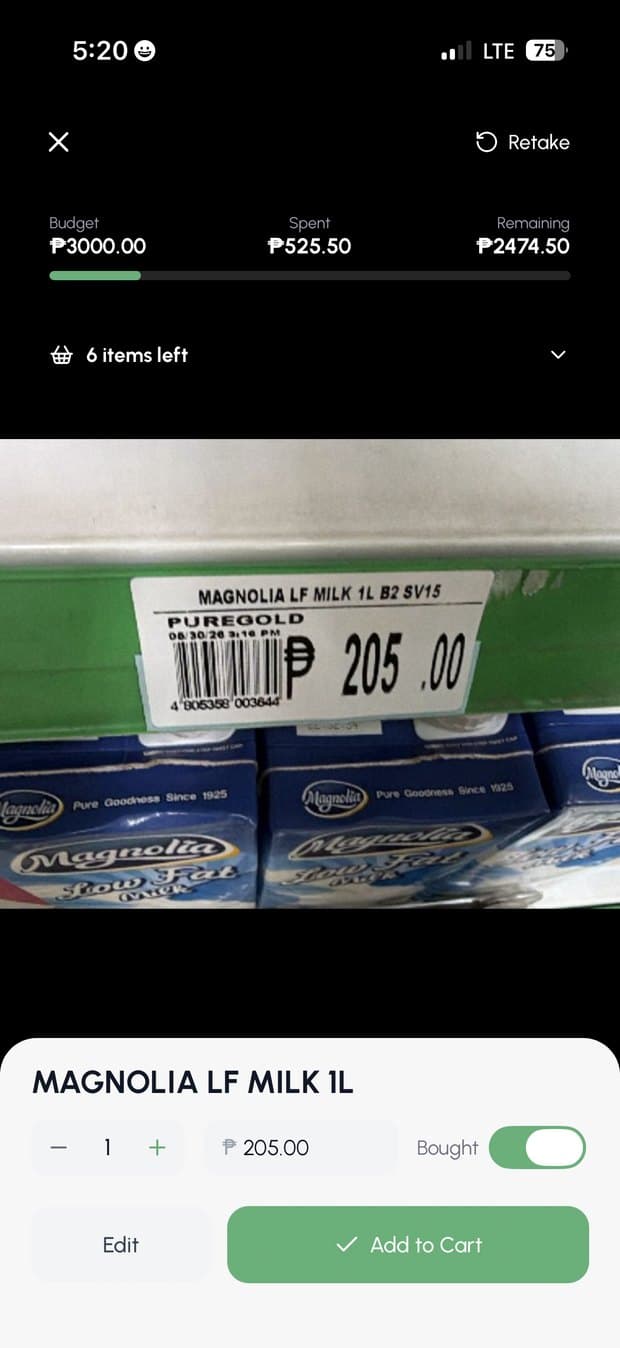
GroceryBudget reads a visible shelf label and captures the item name, price, unit, and category. Your shopping list and remaining budget stay in the scanner so every item updates the total before checkout.


One view, three jobs
Capture the product name, shelf price, unit, and category without typing each field.
Budget, Spent, and Remaining update as scanned items enter the cart.
See what is still left to find and match a scanned product to an existing list item.
Built for the aisle
A receipt scanner explains what already happened. The price-tag scanner helps while there is still time to swap an item, skip an impulse purchase, or stay below the trip budget.
Already checked out? The receipt scanner records the completed trip. Both workflows contribute to your personal price history.
Ready for the aisle
Start with 3 free label scans and experience the full camera-to-cart workflow. Premium keeps scanning unlimited whenever it becomes part of your routine.
The scanner reads the label in front of you rather than looking up a barcode in a retailer-price database.
Questions
GroceryBudget reads the visible item name, price, unit, and category from a grocery product or shelf label. You can review the result before adding or updating the item in your cart.
You receive 3 free AI label scans to try the complete workflow. Premium unlocks unlimited label scanning and unlimited grocery receipt scanning.
No. It reads the text and price visible on the label with the camera. It is not a barcode-price database and does not claim to contain every retailer’s live catalog.
Yes. The scanner keeps Budget, Spent, and Remaining visible while you scan, and its list panel shows which planned items are still left to find.
Yes. AI image analysis requires an internet connection. Core lists, budgets, saved price memory, and voice entry continue to work offline.
Glare, motion blur, very small text, obstructed prices, unusual promotional labels, or missing shelf information can reduce accuracy. Confirm the result before adding it to the cart.
Available on iPhone and Android. No account required to begin.