See Your Grocery Spending Live as You Scan (2026)
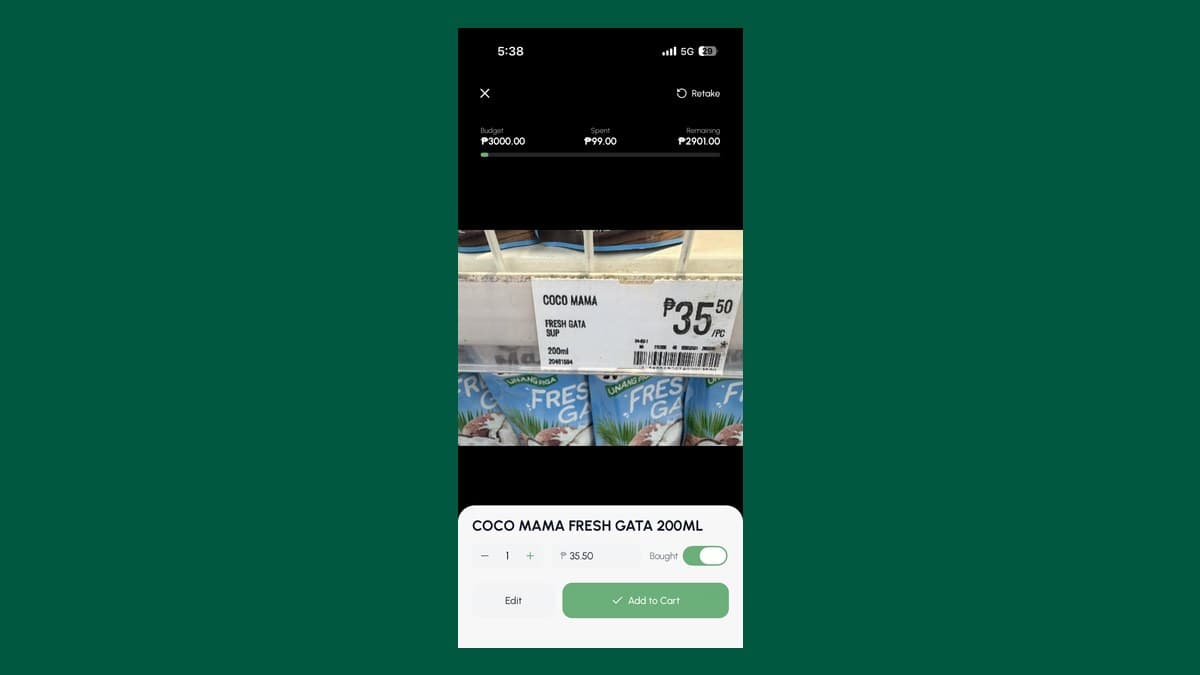
GroceryBudget's camera scanner now shows your budget and list right in the viewfinder. Scan an item, watch the total update, know where you stand instantly.
Key Takeaways
• The scanner now shows a live budget bar — Budget, Spent, Remaining — right inside the camera.
• Your unchecked list sits in a tap-to-expand panel, so you can scan and check off without switching screens.
• Scan an item as you drop it in the basket and your running total updates instantly — no leaving the camera.
Scan shelf labels and keep a live cart total
Capture the visible item and price while your remaining trip budget stays on screen.
Explore the price-tag scanner →

Most grocery apps make scanning a detour. You point the camera, capture the item, get kicked back to a list, scroll to find your total, then start over for the next thing. By the third item you've stopped checking your budget entirely — which is exactly when overspending starts.
For the product overview, supported platforms, free allowance, and scanner limitations, see the GroceryBudget grocery price-tag scanner.
We rebuilt the camera scanner so you never have to leave it. Your budget and your shopping list now live right inside the viewfinder. Scan, see your total move, keep going.
Your Budget, Live in the Viewfinder
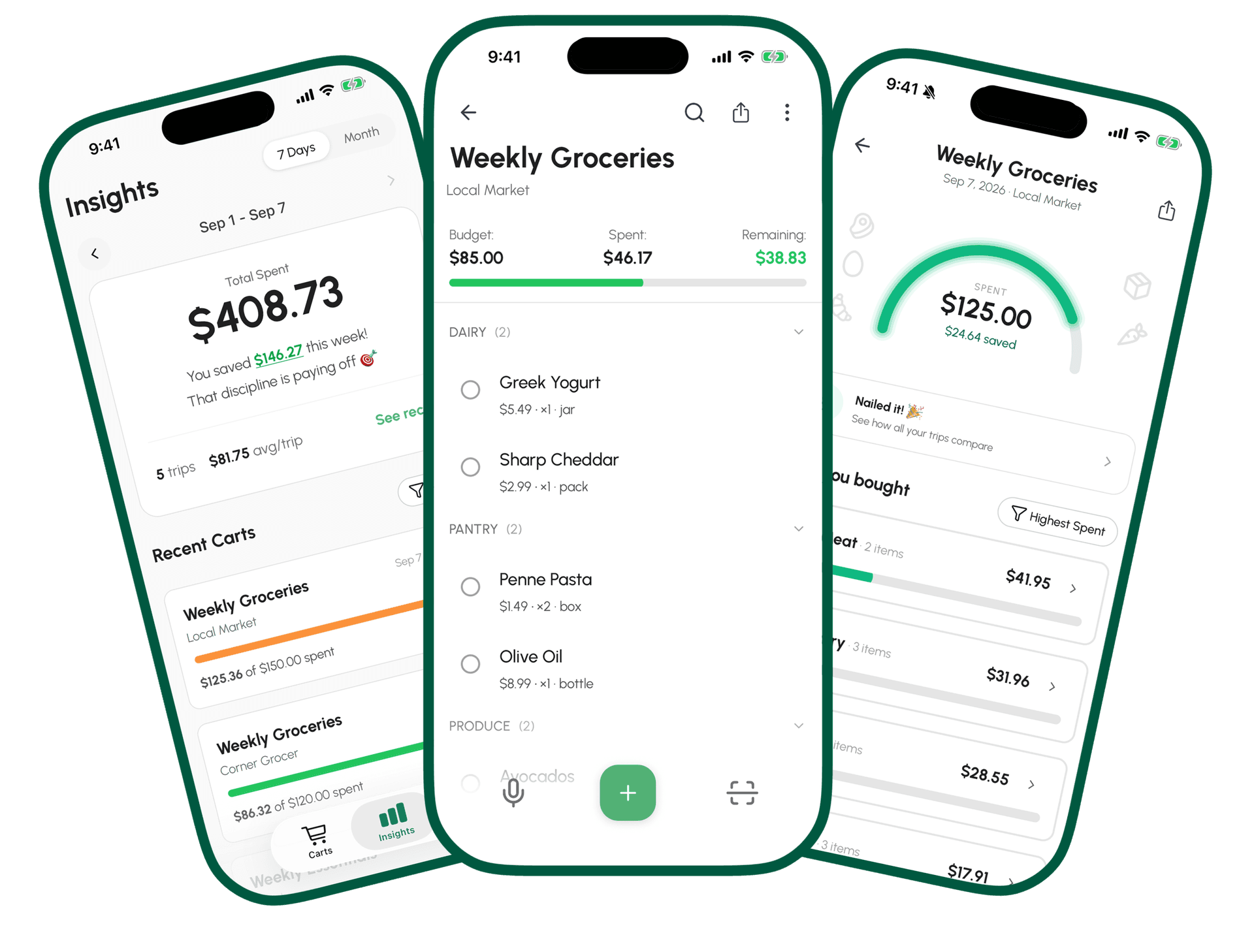
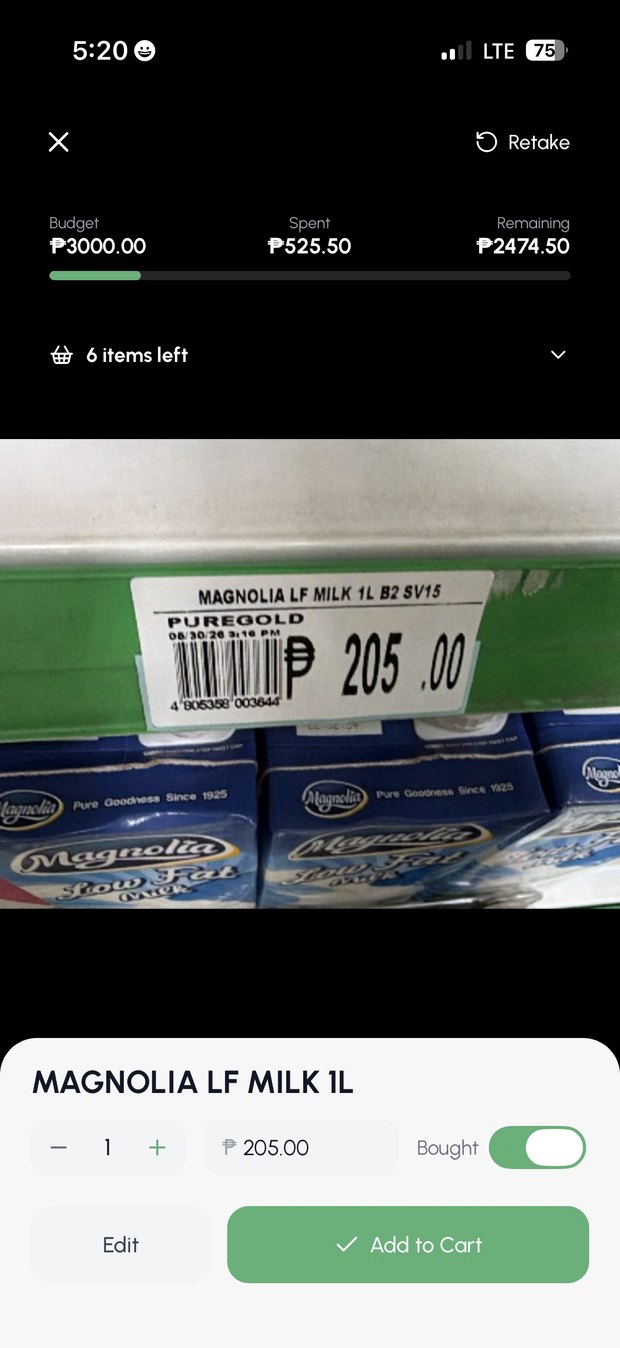
At the top of the scanner there's now a three-part budget bar: Budget, Spent, and Remaining. It's the same display you see on your cart screen — just brought into the camera so the number is in front of you while you shop.
It changes color as you go:
- Green while you're comfortably under budget
- Orange as you cross 75% — the "ease up" warning
- Red the moment you go over, with Remaining flipping negative
The bar animates as each scanned item lands, so you feel the total move in real time. No mental math in the aisle, no exiting to check. You watch your remaining budget shrink with each item and decide — in the moment — whether the next thing goes in the cart.
If a cart has no budget set, the bar simply doesn't appear. Nothing to clutter the view.
Your List, One Tap Away
Underneath the budget bar is a slim panel showing how many items you still have left to find — `🧺 4 items left`. Tap it and your unchecked list slides open, right over the camera. Each item shows its name, quantity, and the price you expect to pay.
This solves the other reason scanning used to break flow: you no longer switch screens to remember what's next. Glance at the panel, grab the item, scan it, watch it drop off the list. When the panel reaches zero it turns green — ✓ All items found, tap to finish — and sends you back to your cart in one tap.
Scanning That Knows Your List
Here's the part that quietly saves the most time. When you scan a product, the scanner checks it against what's already on your list. Scan a bottle of Downy and it recognizes that as the "fabric conditioner" you wrote down — and updates that item instead of adding a duplicate. Scan an off-list impulse buy and it adds it fresh, with the full product name.
So a vague list written from memory ("fabric conditioner," "cooking oil," "shampoo") resolves itself into the real branded products as you scan them at the shelf. No duplicates to clean up later, no second-guessing whether you already had it down.
Scan shelf labels and keep a live cart total
Capture the visible item and price while your remaining trip budget stays on screen.
Explore the price-tag scanner →Mark As You Bag
Flip the Mark as Bought toggle once at the start and it stays on for the whole session. Now every item you scan is logged as bought the instant you capture it — the natural rhythm when you're scanning things as they go into the basket. One flick sets the mode; you don't re-tap for all twelve items. Close the scanner and it resets for next time.
That's the workflow the budget bar was built for: scan the item as it goes in the cart, watch Remaining drop, move on. Your spending total is always current because it's updating as you physically shop, not after.
Why This Matters
The whole point of a grocery budget is to change a decision before you've spent the money — while you're still standing in front of the shelf. An app that only tells you the damage after checkout has missed the moment.
By putting the budget and the list inside the camera, the scanner closes that gap. The information you need to decide is in the same place you're already looking. You see you're at ₱4,800 of a ₱5,000 budget with the bar glowing orange, and you put the third snack back. That's the entire game.
How to Use It
- Open a cart and set a budget — the bar only shows when there's a target to track against.
- Add your list — even rough, from-memory entries work; scanning resolves them to real products.
- Tap the camera and flip Mark as Bought on.
- Scan each item as it goes in your basket. Watch Remaining update, glance at the list panel for what's next.
- When the panel turns green, tap to finish — back to your cart, total already tallied.
You get 3 free camera scans to try it — Premium unlocks unlimited scans on every plan. Voice dictation — saying items instead of scanning — is free and unlimited, so you can try the Smart Add workflow before you upgrade.
Download GroceryBudget on the App Store — works offline, no account needed.
Also on Android: Google Play.
---
Also useful: Smart Add: Say It or Scan It for the full input toolkit, How to Track Grocery Spending for the method, and Does Tracking Groceries Actually Save Money? for whether it's worth the effort.
Frequently Asked Questions
Can I track my grocery spending while shopping?+
Yes. GroceryBudget's camera scanner shows a live budget bar — Budget, Spent, and Remaining — inside the viewfinder, so your running total updates as you scan each item without leaving the camera.
How does the GroceryBudget camera scanner work?+
Point your camera at a product or shelf label and AI reads the item name, price, unit, and category. It also matches what you scan to your existing list and updates your budget total in real time.
Is the camera scanner free?+
You get 3 free AI camera scans to try it; Premium unlocks unlimited scanning. Voice Smart Add — saying items instead of scanning — is free and unlimited.